

In this example, we will create a custom function to find the week number for the specified date.
For this example, sample data consists of employee’s attendance data which includes date, employee id and attendance status.
We want to find the week number for a particular date.
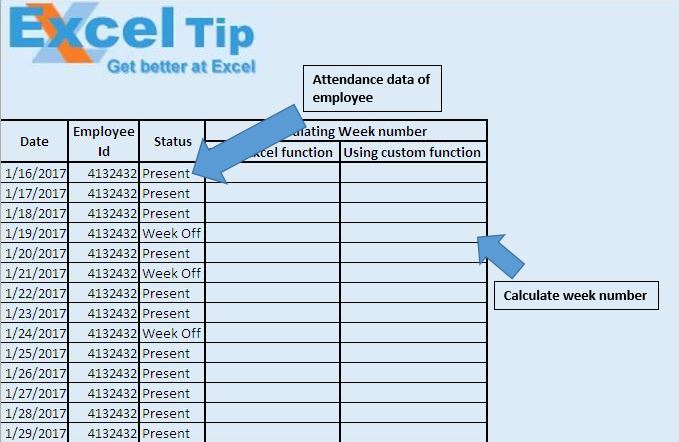
In this example, we have used both in built functions “WEEKNUM” and custom function “Display_WeekNum” to calculate the week number for the given date.
Excel has in built function “WEEKNUM” to find the week number.
Syntax of WEEKNUM function
=WEEKNUM(Date,FirstDayOfWeek)
Date parameter specifies the date for which one wants to find the week number and FirstDayOfWeek specifies the day which needs to be considered as the first day of the week.
We have also build custom function “Display_WeekNum” to find the week number for the given date.
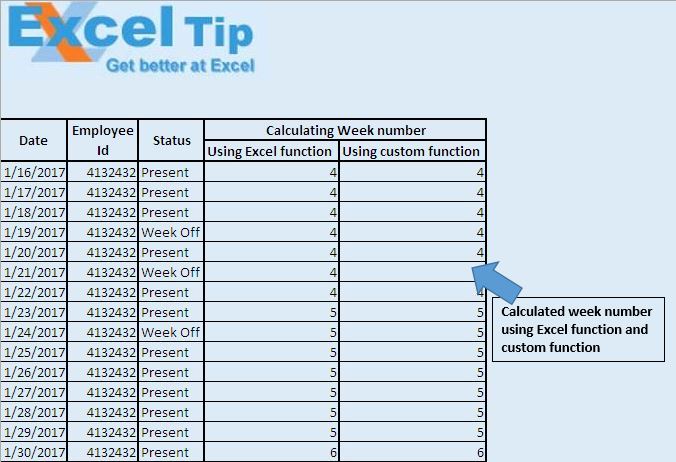
Logic explanation
In the “Display_WeekNum” custom function, we have used WorksheetFunction to access the inbuilt WEEKNUM function of the Excel. This function takes date as input parameter and returns the week number. By default, this function considers Monday as first day of the week.
Please follow below for the code
Option Explicit

Function Display_WeekNum(DefinedDate As Date)

Display_WeekNum = WorksheetFunction.WeekNum(DefinedDate, vbMonday)

End Function
If you liked this blog, share it with your friends on Facebook. Also, you can follow us on Twitter and Facebook.
We would love to hear from you, do let us know how we can improve our work and make it better for you. Write to us at info@exceltip.com
The applications/code on this site are distributed as is and without warranties or liability. In no event shall the owner of the copyrights, or the authors of the applications/code be liable for any loss of profit, any problems or any damage resulting from the use or evaluation of the applications/code.




Better way..
this_week = VBAWeekNum(Date, vbMonday) ' start week on monday