

In this article we will learn how we can round the numbers to thousands with hundreds as a decimal in Microsoft Excel 2010.
To round to thousands with hundreds as a decimal we can use the Custom Format or Round formula.
We can round the numbers from the 2 different ways.
1st Custom Format
2nd Round Function
Custom Format: -We can use Custom Number Format, to display a Number in Million or Display it in some Color. It’s a tool from in old versions of excel when there was no Conditional Formatting option in Excel. All conditional options are performed by using Custom Number Formal.
ROUND: - This function is used to round a number to a specified number of digits.
Syntax of “ROUND” function: =ROUND (number, num_digits)
Example:Cell A1 contains the number 456.25
=ROUND (A1, 0), function will return 456

Round the number to Thousands with hundreds as a decimal by using the Custom Format
Let’s take an example and understand.
We have categorized Income data. In which column D contains City Name, column E contains Gender and column F contains Income in $. We want to format income.
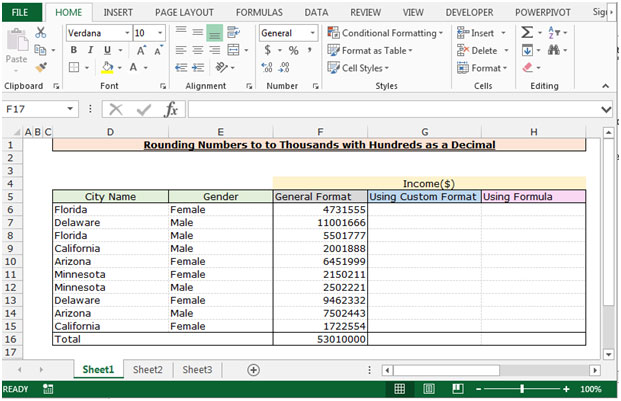
To Round the Numbers to Thousands with Hundreds as a Decimal follow below given steps:-
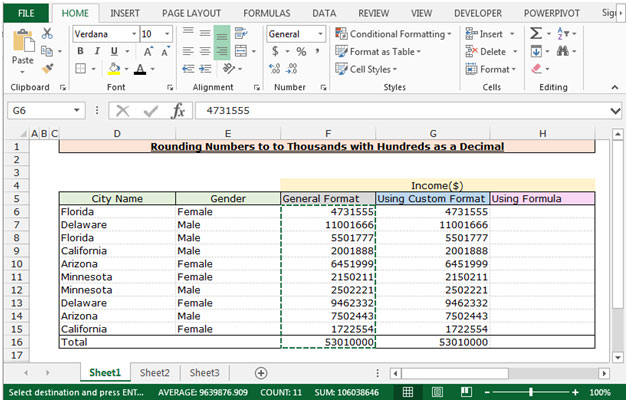
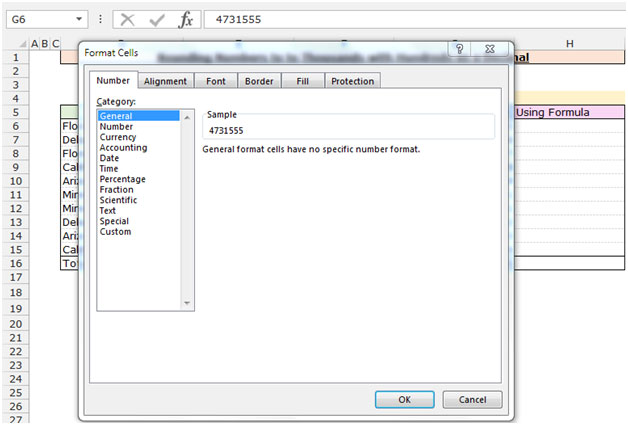
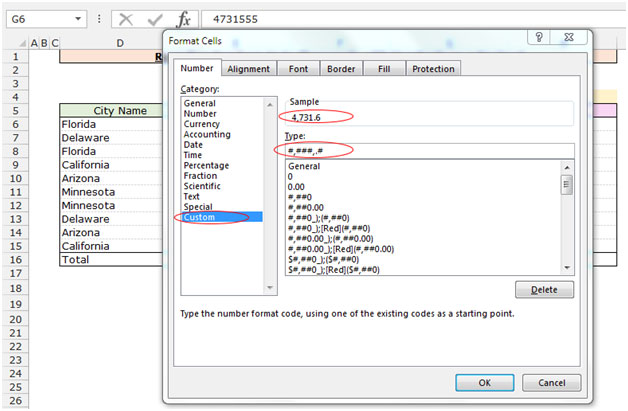
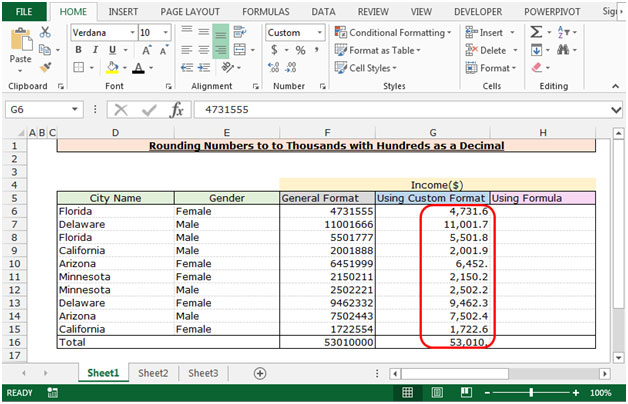
We will learn about the 2nd way to convert the numbers in thousands with hundreds as decimals.
Round the number by using the Round Function
Let’s understand with a simple exercise
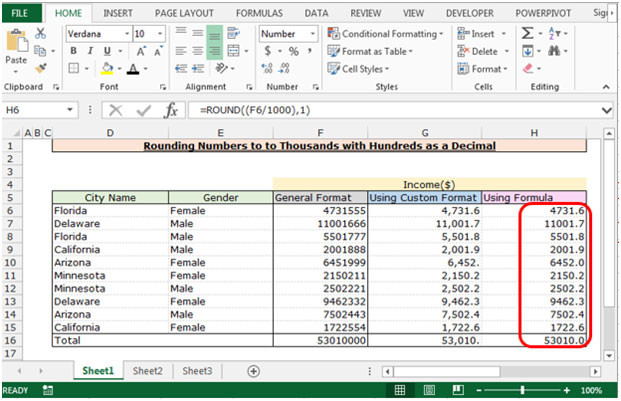
This is the way we can round the number in thousands with hundreds as a decimal by using the formula and Custom Format in Microsoft Excel.
The applications/code on this site are distributed as is and without warranties or liability. In no event shall the owner of the copyrights, or the authors of the applications/code be liable for any loss of profit, any problems or any damage resulting from the use or evaluation of the applications/code.




I saved my VBA Project in Excel with a password. i forgot the password and now I am not able to open my VB Project in Excel. is there any method of opening the VBA Project
"Hi Hasen,
That helps quite a lot!
I would still like to see some definitive examlpes though.
How are the following represented:
5
10
15
50
100
150
500
1000
1500
5000
10000
15000
50000
100000
150000
500000
1000000
1500000
5000000
10000000
15000000
50000000
Thanks,
Alan."
"Let's see if this helps:
Unit, Ten, Hundred, Thousand, (100 thousand) Lac, Ten Lacs (1 million), (100 Lacs) Crore (10 million), Ten Crore (100 million), (100 Crore) Arrab (1 billion), Ten Arrab,(100 Arrab) Kharrab, Ten Kharrab.
As you can see that the accounting in the Sub-Continent is based on 100-unit system. You get a new unit when it has 100 of the current units. Whereas in the western accounting system, 1-million is made of 10-units of 100-thousand. 1-billion is made of 1000-units of million.
I hope it is clear that
hasen"
"Hi Jospeh,
You may have shed some light on this!
You state that:
""5 millioin= 50,00,000 or 50 lacs""
However, in his original post, Prashanth is quite explicit that:
""We format 5 million in India as 5,00,000""
Obviously you cannot both be correct, or if you are then Excel cannot possibly display both at once!
Joseph - Your email seems both internally consistent, and consistent with that of Amit.
Perhaps Prashanth is confused about how the numbers are represented?
Is anyone still interested in an answer to this? If so, please can you reply, setting out a few examples across all orders of magnitude from 10^1 to, say, 10^10 and be VERY CAREFUL about how you type.
Thanks,
Alan.
"
10 million = 100 lacs 100 million = 200 lacs 500 million = 1000 lacs
I just happened to visit your site and found the discussion quite amusing. I do agree that the Indian system can be confusing at first. The confusion is based on errors in typing and not in conception. To follow Prashant's logic 1 million= 10,00,000 or 10 lacs. It logically then follows that 5 millioin= 50,00,000 or 50 lacs. 10 million=100,00,000 or 100 lacs. To make matter more confusing the "crore" is another traditional unit of counting. 1 crore = 10 million. The reason one finds the system cumbersone is that the Indian system, to my knowledge, does not have an equivalent term for a million. The system is based on units, tens, thousands, lacs, crores, etc. but no million. I hope this helps.
"Hi Amit,
Thanks for the additional examples.
However, I have to admit that I still cannot see how to generalise from the examples you and Prashanth have given.
For example:
If one million is represented as ""10,00,000"" then how can five million be represented as ""5,00,000"" (refer to Prashanth's original post above)?
I'm afraid this seems devoid of any logic to me. I do not mean to be offensive - apologies if I seem so.
However, in order to come up with a general custom format, we need to understand the logic behind the way you are representing the numbers. Without a logical (rule based) approach, there is no way that I can see to help you.
Thanks,
Alan."
"One Million is typically represented as 1,000,000. In India, we call it 10 lacs and represent it as 10,00,000. Similarly, 100Million is represented as 10,00,00,000.
How do we do this type of formatting in Excel?"
"Hi Prashanth,
I cannot understand the logic of how you say you format numbers in India.
How do you arrive at:
5,00,000 to represent 5 million?
Is there some kind of implied multiplication in the fact that the leading 5 is grouped on its own?
Also, it appears (to my English eyes) to be inconsistent with the formatting of 500 million as:
50,00,00,000
In this example, the removal of the commas would result in the same numerals as we would use in New Zealand (500000000) if you stripped the formatting.
This seems difference (to me) to the way in which 5 million is reduced to what I would expect to be five hundred thousand (500000) above.
Please can you elaborate on the Indian formatting system a little more, and hopefully we can find a custom format that works for you.
Alan."
We format 5 million in India as 5,00,000, and 500 million as 50,00,00,000. How do we get this kind of number formatting in Excel?