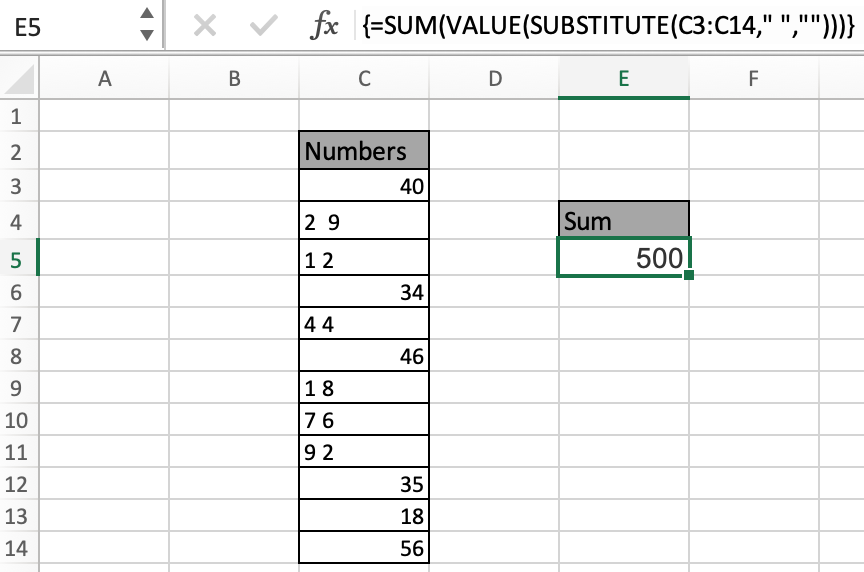
Mine doesn't work
hanelg wrote on July 05, 2005 22:24 EST |
I'm using excel 2003. I tried n tried but seems to always end up with a
#VALUE!
Did anyone able to get it.I know it simple but it kindda driving me carzy when it did'ntwork for me.:C |
Reply: hanelg
Alan wrote on July 07, 2005 00:05 EST |
Hi hanelg,
[QUOTE=hanelg]I'm using excel 2003. I tried n tried but seems to always end up with a
#VALUE!
Did anyone able to get it.I know it simple but it kindda driving me carzy when it did'ntwork for me.:C[/QUOTE]Did you enter it as an array formula?
Alan. |
pacific poker
pacific poker wrote on July 09, 2005 00:13 EST |
| |
dave wrote on December 31, 1969 19:00 EST |
| The only way I got it to work is create 2 columns, put the =VALUE(SUBSTITUTE(B1," ","")) in the next column and then sum them up? |
User of 2003
Mike wrote on December 31, 1969 19:00 EST |
| It worked fine for me.....don't forget to set the array |
array formula
michaelas wrote on October 12, 2005 22:22 EST |
It didn't work for me until I remembered that with an array formula you have to use Ctrl-Shift-Enter, and then that was it!
michaelas |
Amount to convert into words
Sudhir P wrote on December 31, 1969 19:00 EST |
| Can we convert the numeric amount into words..i.e. Rs. 148250.00 (Rupee One Lac Forty Eight Thousand Two Hundred Fifty Only)..Is there any simple formula...Pls help |
Ingeniero1 wrote on October 13, 2005 09:58 EST |
Why the redundant spaces, anyway?
At first I thought that they were used instead of the comma; i.e., 3 300 = 3,300 but then realized that is not the case looking at 50 0 and 10 50.
Thanks |
As I look from Mount Olympus
Thor wrote on December 31, 1969 19:00 EST |
| You mortals must have to much time on your hands. Any normal person would put the column in an editor and remove the spaces |
Reply: Ingeniero1
Alan wrote on October 13, 2005 20:57 EST |
Hi Ingeniero1,
[QUOTE=Ingeniero1]Why the redundant spaces, anyway?
At first I thought that they were used instead of the comma; i.e., 3 300 = 3,300 but then realized that is not the case looking at 50 0 and 10 50.
Thanks[/QUOTE]I'm not sure what context you are asking the quesiton in, but a redundant space normally refers to having a space within a number such as 1234 being represented as:
12 34
This is often the result of bringing data in from an 'unclean' source such as a formatted report.
HTH,
Alan. |
Amount to convert into words
mahendra wrote on December 31, 1969 19:00 EST |
| Can we convert the numeric amount into words..i.e. Rs. 148250.00 (Rupee One Lac Forty Eight Thousand Two Hundred Fifty Only)..Is there any simple formula...Pls help |
shantanuo wrote on October 28, 2005 00:10 EST |
Mahendra commented:
>> Can we convert the numeric amount into words..i.e. Rs. 148250.00 (Rupee One
>> Lac Forty Eight Thousand Two Hundred Fifty Only)..
>> Is there any simple formula...Pls help
1) Such request should be posted on excel forums as a new topic and not here.
2) There is no "simple formula" available. A complex one can be found here...
[url]http://www.mrexcel.com/board2/viewtopic.php?t=62472&start=10[/url] |
Problem
Gagan wrote on December 31, 1969 19:00 EST |
| Is there is any Simple method to covert the Number into Word for instance like ( 1400 into One thousand four hunderd ) please let me know I am not able to get this one I am using Office XP. |
Amount to convert into words
shailesh gandharv wrote on December 31, 1969 19:00 EST |
| Can we convert the numeric amount into words..i.e. Rs. 148250.00 (Rupee One Lac Forty Eight Thousand Two Hundred Fifty Only)..Is there any simple formula in xls and ms access...Pls help |
I dont get it
Ali wrote on December 31, 1969 19:00 EST |
I understand that array functions are functions that return an array, but why would a function which return only one value be called an array function!!! I know its not directly related to this tip, its more of a general issue I have with excel.
Also many other function which take a range as input, have do no have this problem, so why do some function which receive an array as input must be classified as array function! very weird stuff |
What am I doing wrong?
Cumberland wrote on April 26, 2006 05:53 EST |
| Try as I might, I type the formula exactly as written, press CTRL-SHIFT-ENTER, and keep getting "The formula you entered contains an error" message. Why isn't it working??? |
I know now!
Cumberland wrote on April 26, 2006 08:37 EST |
The answer is: don't type the {} brackets before pressing CTRL-SHIFT-ENTER.
Duh! |
Duh? - how fast you forget....
LTUser54 wrote on April 26, 2006 11:19 EST |
previously posted:
Try as I might, I type the formula exactly as written, press CTRL-SHIFT-ENTER, and keep getting "The formula you entered contains an error" message. Why isn't it working???
(reply:
Cumberland wrote on April 26, 2006 07:37 EST
The answer is: don't type the {} brackets before pressing CTRL-SHIFT-ENTER.
Duh!
=========================
Once again, those that have suffered through a MS Excel course or been tutored personally know what to do, and forget how stinky and bad and crummy and incompetent MS is at helping new users with their product. The MS Help function is abominable. Fiding out what terms really mean (and their applications) is an exercise in frustration.
REALLY finding out what sequence of steps to use, what commands to use, where to save macros, how to WRITE macros, and really WHAT TO DO is frustrating beyond belief. MS has no high level algorithm to help, no worthwhile "wizzer", NOTHING that actually helps anyone with reasonable intelligence to assist them in using their product.
Save your "Duh!" for yourself. I guess it makes you feel all superior that you had to learn commands and procedures that should NOT be necessary to learn, if MS was providing support software that helped.
Not a rant, merely commenting on a truly inferior product with aggravating aspects to it. Please everyone, lets keep posting our REAL problems (that MS has a crappy product) until SOMEBODY actually pays attention and IMPROVES IT!!! Having to rely on a forum to get help for a bad product is a waste of everyone's time.
Take care, all.
Mark |
re: Duh!
MDiaz wrote on December 31, 1969 19:00 EST |
posted:
Try as I might, I type the formula exactly as written, press CTRL-SHIFT-ENTER, and keep getting "The formula you entered contains an error" message. Why isn't it working???
I know now!
Cumberland wrote on April 26, 2006 07:37 EST
The answer is: don't type the {} brackets before pressing CTRL-SHIFT-ENTER.
Duh!
=========================
Once again, those that have suffered through a MS Excel course or been tutored personally know what to do, and forget how stinky and bad and crummy and incompetent MS is at actually telling new users how to use their product. The MS Help function is abominable. Fiding out what terms really mean (and their applications) is an exercise in frustration. REALLY finding out what sequence of steps to use, what commands to use, where to save macros, really WHAT TO DO is frustrating beyond belief. MS has no high level algorithm to help, no worthwhile "wizzer", NOTHING that actually helps anyone with reasonable intelligence to assist them in using their product. Save your "Duh!" for yourself. I guess it makes you feel all superior that you have had to learn commands and procedures that should NOT be necessary to learn, were MS providing support software that helped.
Not a rant, merely commenting on an inferior product with aggravating aspects.
Take care, all.
Mark |
Simplify, simplify
Marshall Waddel wrote on April 26, 2006 11:40 EST |
| Would it not be simpler to select the entire range of cells that have spaces in their number entries, type Control-H (Replace), and replace all spaces with no spaces? |
Simlify
Curtis Martin wrote on December 31, 1969 19:00 EST |
| I agree with Marshall. We have a lot of text reports that we download into excel using text-to-columns. The Ctrl-H is much easier solution. I think this is a "cool" formula, but I can't see a practical application for it. |
BlueDaze wrote on April 26, 2006 12:39 EST |
[QUOTE=Thor]You mortals must have to much time on your hands. Any normal person would put the column in an editor and remove the spaces[/QUOTE]
Mt. Olympus must not get a whole lot of excel training. To remove spaces simply highlight the cells or column and do a Find and Replace (ctrl + h) for one space. Then a sum formula will work just fine. |
Thanks for the Ctrl-Shift-Enter Tip for setting the array
John wrote on December 31, 1969 19:00 EST |
|
basic user instrucs
mk wrote on December 31, 1969 19:00 EST |
| enter the formula (in formula bar or cell) without {}, then press CTRL+SHIFT+ENTER. |
How to use Ctrl H function?
SD wrote on December 31, 1969 19:00 EST |
| How do you use the Ctrl H function? I did press Ctrl H, then need to enter what to find and replace. How do you indicated a space and then how to indicate no space? |
please help me
ebadullahmomin@yahoo.com wrote on December 31, 1969 19:00 EST |
| Can we convert the numeric amount into words..i.e. Rs. 148250.00 (Rupee One Lac Forty Eight Thousand Two Hundred Fifty Only)..Is there any simple formula in xls and ms access...Pls help |
Convert Numeric Amount to Words
Rup wrote on August 22, 2006 04:28 EST |
Plz try link - See [url]http://www.xldynamic.com/source/xld.xlFAQ0004.html[/url]
Regards
Rup |
v_rjsh wrote on August 22, 2006 16:52 EST |
[QUOTE=ebadullahmomin@yahoo.com]Can we convert the numeric amount into words..i.e. Rs. 148250.00 (Rupee One Lac Forty Eight Thousand Two Hundred Fifty Only)..Is there any simple formula in xls and ms access...Pls help[/QUOTE]
Imagine a situation where you send a quote or invoice generated from Excel. Here you'd want the amount to be spelt out in words. Ex. Rs.100 to be spelt as Rupees One Zero Zero.
For this, splitting the digits is the first step. Then you'd have to use a lot of nested IF's to convert the numbers into text for values 1 to 0 of each corresponding cell (remember, excel lets you use only 8 nested conditions).
It'll be like this for the first digit of a 5 digit number:
=IF(I27=1,"One Lakh",(IF(I27=2,"Two Lakhs",(IF(I27=3,"Three Lakhs",(IF(I27=4,"Four Lakhs",(IF(I27=5,"Five Lakhs",(IF(I27=6,"Six Lakhs",(IF(I27=7,"Seven Lakhs",(IF(I27=8,"Eight Lakhs")))))))))))))))
For the same 5 digit number, for 9 to 0 [to overcome 8 nesting limit problem]:
=IF(I28=FALSE,(IF(I27=8,"Eight Lakhs",(IF(I27=9,"Nine Lakhs",IF(I27=0,"Zero","NA"))))))
After you do the same for all digits, here's what you do to display as words:
=CONCATENATE("Rupees "," ",I30," ",J30," ",K30," ",L30," and ",M30," ",N30," Only")
And the result i got for the amount Rs. 144958 is:
Rupees One Lakh Forty Four thousand Nine hundred and Fifty Eight Only
Sorry if it all sounds too complex guys, but that's the way I've been doing it. |